
In This Article
Picture this: it’s 3 PM on a Wednesday, and your lower back feels like it’s staging a protest. Your neck’s gone stiff, your wrists are throbbing, and you’ve already downed three cups of coffee just to push through the discomfort. Sound familiar? You’re certainly not alone.
With over 40% of UK workers now splitting their time between home and office spaces, creating a proper ergonomic home office setup has shifted from “nice to have” to absolutely essential. The Health and Safety Executive (HSE) reports that work-related musculoskeletal disorders affect more than 500,000 workers annually in the UK – and poorly designed workspaces are a major culprit.
But here’s the brilliant news: transforming your workspace doesn’t require an interior designer’s budget or a complete room overhaul. Whether you’re working from a spare bedroom, kitchen table, or dedicated office, the right ergonomic home office setup can dramatically reduce discomfort whilst boosting your productivity and focus. In this comprehensive guide, I’ll walk you through seven evidence-based solutions that actually work, featuring real products available on Amazon.co.uk with current UK pricing. Let’s dive in and create a workspace that your body will thank you for! 🚀
Quick Comparison Table
| Product Category | Budget Option | Mid-Range Choice | Premium Pick | Price Range |
|---|---|---|---|---|
| Office Chair | YONISEE Ergonomic | Amazon Basics Ergonomic | SIHOO Doro C300 | £60-£320 |
| Standing Desk | FEZIBO Manual | FLEXISPOT EF1 | FLEXISPOT Premium | £75-£230 |
| Monitor Arm | BONTEC Single | Amazon Basics Single | HUANUO Gas Spring | £20-£35 |
| Keyboard & Mouse | Amazon Basics Wireless | Logitech Wave Keys | Microsoft Ergonomic | £25-£85 |
| Desk Lamp | LED Touch Control | Airlonv Flexible | BenQ e-Reading | £15-£120 |
| Footrest | Foam Adjustable | ROYALAY 3-Height | StrongTek Wood | £12-£45 |
| Laptop Stand | BoYata Aluminium | Nulaxy Adjustable | Kensington Premium | £20-£55 |
💬 Just one click – help others make better buying decisions too! 😊
Top 7 Ergonomic Home Office Essentials: Expert Analysis
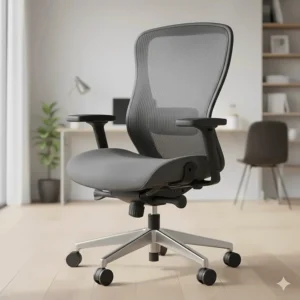
1. YONISEE Ergonomic Office Chair – Best Budget-Friendly Option
When it comes to desk ergonomics checklist essentials, a quality chair tops the list. The YONISEE Ergonomic Office Chair delivers impressive value without breaking the bank.
Key Specifications:
- S-shaped backrest with adjustable 2D lumbar support
- Flip-up padded armrests for space-saving
- Height adjustment: supports users 160-185cm
- Weight capacity: 136kg
Price: £60-£80
UK Customer Feedback: Buyers consistently praise its straightforward assembly and solid build quality for the price point. One Edinburgh reviewer noted, “Easy to assemble, sturdy enough for both sitting and standing positions, and the breathable mesh keeps me cool during long work sessions.”
✅ Pros:
- Excellent value for money
- Breathable mesh back prevents overheating
- Easy assembly in under 45 minutes
❌ Cons:
- Limited headrest adjustment
- May feel firm initially (requires break-in period)
2. FLEXISPOT EF1 Electric Standing Desk – Editor’s Choice
Transform your workspace layout ideas with the FLEXISPOT EF1, which seamlessly transitions between sitting and standing throughout your workday.
Key Specifications:
- Electric height adjustment: 71-121cm
- Desktop size: 120cm x 60cm (one-piece solid top)
- Memory presets for favourite heights
- Dual motor system with low noise (<50dB)
Price: £180-£230
UK Customer Feedback: Over 85% of UK buyers rate it 4 stars or higher. A Manchester-based remote worker shared, “Simple to assemble, remarkably sturdy even at full height, and the programmable heights are brilliant – no more faffing about finding the right position each time.”
✅ Pros:
- Smooth, quiet height adjustment
- Excellent stability even fully extended
- Built-in cable management
❌ Cons:
- Desktop could be thicker (15mm may chip easily)
- Requires careful assembly to avoid over-tightening
3. Amazon Basics Single Monitor Arm – Best Value Monitor Solution
Proper monitor height positioning is crucial for preventing neck strain. The Amazon Basics Single Monitor Arm offers premium features at an accessible price.
Key Specifications:
- Supports monitors 13-30 inches
- VESA compatible: 75x75mm & 100x100mm
- Full motion: tilt, swivel, rotate
- Maximum weight: 11.3kg
Price: £25-£35
UK Customer Feedback: British buyers appreciate its robust steel construction and smooth adjustments. A Glasgow reviewer mentioned, “Brilliant for freeing up desk space. The arm movements are stiff initially, which actually ensures stability – no monitor droop whatsoever.”
✅ Pros:
- Exceptional build quality for the price
- Frees up 80% of desk surface
- Includes cable management clips
❌ Cons:
- Adjustment joints very stiff initially
- Basic instructions (though installation is straightforward)
4. Amazon Basics Ergonomic Wireless Keyboard and Mouse Combo – Comfortable Typing Solution
Office equipment essentials must include an ergonomic keyboard and mouse combo, and the Amazon Basics Ergonomic Wireless Keyboard and Mouse Combo delivers comfort without compromise.
Key Specifications:
- Wave-design keyboard with cushioned palm rest
- UK QWERTY layout
- 2.4GHz wireless connection (10m range)
- Contoured right-handed mouse with adjustable DPI
Price: £22-£28
UK Customer Feedback: Users consistently highlight the immediate comfort improvement. A Birmingham office worker noted, “The wave design genuinely supports my wrists better than my old flat keyboard. Setup was instant – just plugged in the USB receiver and away I went.”
✅ Pros:
- Plug-and-play setup
- Generous cushioned palm rest
- Reliable wireless connection
❌ Cons:
- Not as premium-feeling as Logitech alternatives
- USB receiver stored in mouse battery compartment (easy to miss)
5. LED Desk Lamp with Touch Control – Affordable Lighting Solution
Creating a comfortable working environment requires proper lighting. This LED Desk Lamp offers versatile illumination for various tasks.
Key Specifications:
- 5 colour modes, 3 brightness levels
- 230° flexible arm, 90° base rotation
- USB A+C charging ports (5V/2.1A)
- Eye-caring flicker-free technology
Price: £15-£22
UK Customer Feedback: Praised for its practicality and space-saving design. A Leeds reviewer commented, “Foldable design saves tonnes of desk space. The USB ports are genuinely useful for charging my phone whilst working. Lighting is soft and doesn’t cause glare on my screen.”
✅ Pros:
- Excellent value with USB charging ports
- Compact, foldable design
- Sleep night light feature
❌ Cons:
- Not suitable for very large desks
- Basic aesthetic compared to premium options
6. ROYALAY Adjustable Footrest – Enhanced Circulation Support
Often overlooked in workspace layout ideas, a quality footrest significantly improves posture and circulation. The ROYALAY Adjustable Footrest offers three height positions for customised comfort.
Key Specifications:
- High-density foam construction
- Three adjustable heights (9cm, 12cm, 15cm)
- Washable cover
- Dimensions: 43cm x 28cm x 15cm
Price: £18-£25
UK Customer Feedback: UK buyers appreciate its sturdy construction and comfort. A Southampton remote worker shared, “Proper game-changer for my lower back pain. The foam is firm enough to provide support but comfortable for all-day use. Highly recommend for shorter individuals.”
✅ Pros:
- Firm, supportive foam
- Removable, washable cover
- Three height options accommodate different users
❌ Cons:
- Foam may feel very firm initially
- Not suitable for rocking/movement
7. BoYata Laptop Stand – Premium Elevation Solution
For laptop users, the BoYata Laptop Stand transforms any laptop into an ergonomically positioned workstation when paired with an external keyboard and mouse.
Key Specifications:
- Aluminium alloy construction
- Adjustable height and angle
- Supports laptops 10-17 inches
- Heat dissipation design
- Weight capacity: 10kg
Price: £35-£45
UK Customer Feedback: Highly rated by UK professionals for its robust build and versatility. A Bristol designer noted, “Rock-solid construction. Elevates my MacBook to perfect eye level, and the cooling design prevents overheating during intensive work. Worth every penny.”
✅ Pros:
- Premium aluminium build quality
- Excellent heat dissipation
- Stable even with heavy laptops
❌ Cons:
- Heavier than portable alternatives
- Requires external keyboard/mouse for optimal use
✨ Don’t Miss These Exclusive Deals!
🔍 Take your ergonomic home office setup to the next level with these carefully selected products. Click on any highlighted item to check current pricing and availability on Amazon.co.uk. These tools will help you create a comfortable working environment your body will love!
Understanding Ergonomics: The Science Behind Comfortable Workspaces
Ergonomics, or human factors as it’s sometimes called, is the scientific discipline focused on designing spaces, tools, and systems that fit people’s physical and cognitive capabilities. According to the HSE’s human factors guidance, proper ergonomics involves matching the job to the physical and mental strengths and limitations of people.
In practical terms for your home office, this means creating a setup where your body maintains natural, relaxed positions throughout the workday. Your spine should preserve its natural S-curve, your shoulders should remain relaxed (not hunched), and your wrists should stay neutral whilst typing. When these principles are followed, you significantly reduce the risk of developing musculoskeletal disorders – conditions affecting muscles, nerves, tendons, joints, cartilage, and spinal discs.
The beauty of ergonomic design is that it doesn’t just prevent discomfort; it actively enhances productivity. Research consistently shows that workers in ergonomically optimised environments experience less fatigue, make fewer errors, and maintain better focus throughout the day. It’s a win-win scenario where looking after your body simultaneously improves your work output! 💡
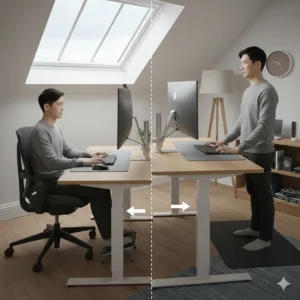
Desk Ergonomics Checklist: Setting Up Your Workspace Properly
Creating the perfect ergonomic home office setup follows specific principles that apply regardless of your budget or space constraints. Here’s your comprehensive desk ergonomics checklist:
Monitor Positioning
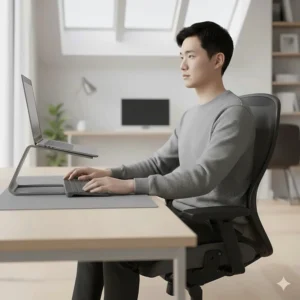
Your screen should sit at arm’s length distance (roughly 50-70cm) with the top of the display at or slightly below eye level. This prevents the neck strain that comes from looking up or down for extended periods. If you’re using a laptop as your primary screen, a laptop stand becomes absolutely essential – otherwise, you’ll inevitably crane your neck downward, creating tension in your cervical spine.
For those working with multiple monitors, position your primary screen directly in front of you, with secondary displays angled at 30-40 degrees to either side. This arrangement minimises neck rotation and keeps your head in a neutral position.
Chair and Desk Height
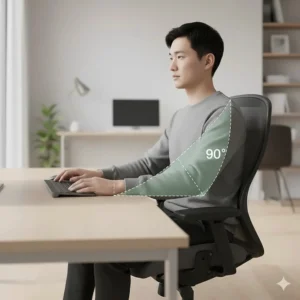
Your feet should rest flat on the floor (or on a footrest if needed) with thighs roughly parallel to the ground. Knees should form a 90-100 degree angle, and there should be a small gap (about two fingers’ width) between the back of your knees and the chair seat edge. This positioning promotes healthy circulation and prevents the numbness that comes from restricted blood flow.
The desk height matters tremendously as well. When your arms hang naturally at your sides, your elbows should form a 90-degree angle when your hands rest on the keyboard. Most desks are 72-76cm high, which suits average-height individuals but may require adjustment through chair height or footrests for shorter or taller people.
Keyboard and Mouse Placement
Position your keyboard directly in front of you with the mouse immediately beside it – not requiring a reach. Your wrists should remain straight whilst typing, not bent up, down, or to either side. This neutral wrist position is crucial for preventing repetitive strain injuries like carpal tunnel syndrome, which affects thousands of UK office workers annually.
Consider using a keyboard tray if your desk is too high, or opt for an ergonomic keyboard with a built-in wrist rest. The wave-design keyboards like the Amazon Basics model naturally guide your hands into healthier positions without requiring conscious adjustment.
Proper Monitor Height Positioning: Getting the Angles Right
The importance of proper monitor height positioning cannot be overstated – it’s arguably the single most critical factor in preventing neck and shoulder pain. The HSE Display Screen Equipment regulations specifically require that screens “can be swivelled and tilted easily and freely to suit the needs of the operator or user.”
Here’s the detailed breakdown: Position the top of your monitor at or slightly below eye level when you’re sitting with proper posture. Your gaze should naturally fall to the centre of the screen without tilting your head. For most people, this means the monitor sits 15-20 degrees below the horizontal line of sight.
Distance matters equally. The optimal viewing distance varies based on screen size – generally, larger monitors sit further away. A 24-inch monitor works well at 60-70cm, whilst a 27-inch display might need 70-90cm. If you find yourself leaning forward to read text, either move the monitor closer or increase the text size in your operating system settings.
Tilt also plays a role. A slight backward tilt of 10-20 degrees often reduces glare from overhead lighting whilst maintaining comfortable viewing angles. Experiment with small adjustments – even minor tweaks can make substantial differences in comfort levels over an eight-hour workday.
Workspace Layout Ideas: Maximising Efficiency and Comfort
Thoughtful workspace layout ideas go beyond just placing furniture randomly. The arrangement of your equipment directly impacts both your physical comfort and workflow efficiency. Let’s explore some proven configurations:
The Classic Linear Setup
Perfect for smaller spaces, this layout positions your desk against a wall with your monitor centred, keyboard directly in front, and frequently used items within easy reach. Place your phone on your non-dominant side to keep your primary hand free for mouse work. This setup works brilliantly in bedrooms or converted spaces where floor area is limited.
The Corner Configuration
Utilising corner spaces efficiently, this L-shaped arrangement provides ample surface area for multiple tasks. Position your computer setup on one side and use the perpendicular surface for paperwork, a printer, or secondary tasks. This layout naturally creates zones for different activities whilst maximising usable desk space.
The Standing Desk Hybrid
For those investing in height-adjustable desks like the FLEXISPOT models, create distinct sitting and standing zones. Keep essential items accessible in both positions – you shouldn’t need to rearrange your workspace each time you adjust the height. Consider using monitor arms to maintain proper screen positioning regardless of desk height.
Cable Management Matters
Often overlooked but crucial for both aesthetics and safety, proper cable management prevents trip hazards and keeps your workspace looking professional. Use cable clips, sleeves, or under-desk trays to route wires neatly. Many modern desks include built-in cable management features – if yours doesn’t, adhesive cable organisers are inexpensive and highly effective.
WFH Productivity Tips: Beyond Physical Setup
Whilst having the right office equipment essentials forms the foundation, true WFH productivity tips extend into habits and routines that complement your ergonomic home office setup:
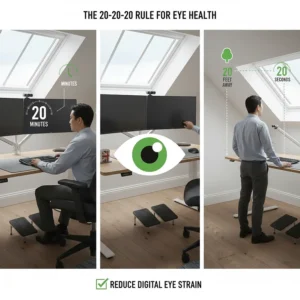
The 20-20-20 Rule
Every 20 minutes, look at something 20 feet (approximately 6 metres) away for at least 20 seconds. This simple practice reduces eye strain from prolonged screen focus – a common complaint among remote workers. Set a gentle timer reminder if you tend to get absorbed in tasks.
Micro-Breaks for Movement
Stand up and move for 1-2 minutes every 30 minutes. This doesn’t mean elaborate stretching routines (though those help too) – even walking to refill your water bottle or doing a few shoulder rolls counts. Movement promotes circulation, prevents stiffness, and actually enhances cognitive function.
Proper Lighting Layering
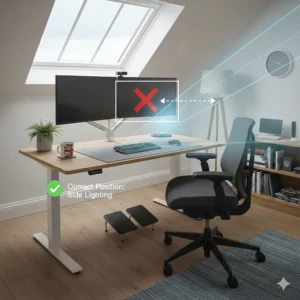
Combine ambient room lighting with task lighting (like your desk lamp) to reduce eye strain and create a pleasant atmosphere. Natural daylight is ideal when available, but avoid positioning your monitor directly in front of or behind windows to prevent glare and harsh backlighting. The LED desk lamps with adjustable colour temperatures let you customise lighting based on time of day and task requirements.
Maintain Social Connections
Working from home can feel isolating. Schedule regular video calls with colleagues for non-work chats, join virtual coffee breaks, or work from cafés occasionally if you’re comfortable doing so. The mental health aspect of remote work is just as important as the physical setup.
✨ Ready to Transform Your Workspace?
🎯 Check out these hand-picked ergonomic solutions on Amazon.co.uk! From adjustable chairs to standing desks, find everything you need to create a comfortable working environment that supports your wellbeing. Your back will thank you! 💪
Office Equipment Essentials: What You Actually Need vs. Nice-to-Haves
When building your ergonomic home office setup, it’s easy to get overwhelmed by the sheer variety of available products. Let me break down what’s genuinely essential versus what falls into the “nice-to-have” category:
Essential Items (Worth Investing In First)
Ergonomic Chair: Absolutely non-negotiable. You’ll spend 6-8 hours daily in this chair – it’s worth investing in quality. Even budget options like the YONISEE provide adequate support if you can’t stretch to premium models initially.
Proper Desk Surface: Whether fixed-height or adjustable, your desk needs sufficient surface area for your equipment without crowding. The standard 120cm x 60cm dimensions work well for most single-monitor setups.
External Keyboard and Mouse (for laptop users): If your laptop is your primary computer, these aren’t optional – they’re essential for achieving proper ergonomics. Laptop keyboards force unhealthy postures when the screen is at the correct height.
Adequate Lighting: Eye strain from poor lighting causes headaches and fatigue. A basic adjustable desk lamp dramatically improves comfort without significant expense.
Highly Beneficial Additions
Monitor Arm: Frees up desk space whilst providing perfect screen positioning. The flexibility to adjust throughout the day is brilliant for maintaining optimal posture.
Footrest: Particularly valuable for shorter individuals or anyone whose feet don’t rest flat on the floor. Improves circulation and lower back support significantly.
Standing Desk or Converter: Allows posture variation throughout the day. Whilst not essential for everyone, many find alternating between sitting and standing reduces fatigue and improves focus.
Nice-to-Have Enhancements
Document Holder: Useful if you frequently reference physical papers whilst typing. Positions documents at eye level rather than flat on the desk.
Wrist Rest: Can provide comfort for some users, though proper keyboard positioning often eliminates the need.
Noise-Cancelling Headphones: Brilliant for concentration in noisy environments, though not strictly ergonomic equipment.
Creating a Comfortable Working Environment: The Full Picture
A truly comfortable working environment extends beyond furniture and equipment into environmental factors that significantly impact your wellbeing:
Temperature Control
The HSE recommends office temperatures between 16-24°C, with 20-22°C considered optimal for sedentary work. Working in spaces that are too cold or too hot reduces concentration and productivity. If you can’t control your room’s temperature precisely, dress in layers and consider a small desk fan or portable heater.
Air Quality and Ventilation
Stale air leads to drowsiness and headaches. Open windows when weather permits, or use an air purifier if outdoor air quality is poor. Indoor plants not only improve aesthetics but can also enhance air quality naturally – spider plants, peace lilies, and snake plants are particularly effective and low-maintenance.
Acoustic Considerations
Excessive noise disrupts concentration, whilst complete silence can feel oppressive. Many remote workers find background music or white noise helpful for maintaining focus. If your home environment is particularly noisy, acoustic panels or even heavy curtains can dampen sound transmission.
Personalisation and Aesthetics
Don’t underestimate the psychological impact of your workspace appearance. Whilst this might seem frivolous compared to ergonomic concerns, working in an environment you find pleasant genuinely affects motivation and mood. Add personal touches like photos, artwork, or decorative items that bring you joy without creating clutter.
Minimising Digital Eye Strain
Beyond the 20-20-20 rule, consider using blue light filtering on your devices in the evening, adjusting screen brightness to match ambient lighting levels, and ensuring text size is comfortable to read without squinting. Many modern monitors include eye-care features specifically designed to reduce strain during extended use.
Common Ergonomic Mistakes and How to Avoid Them
Even with the best intentions, many home workers fall into these common traps:
The Sofa or Bed Workspace
We’ve all done it – working from the sofa with a laptop balanced on our knees seems comfortable initially but causes significant problems over time. These positions force your spine into unnatural curves and your neck into awkward angles. If you occasionally need to work from the living room, at least use a lap desk or cushions to improve positioning.
Ignoring Warning Signs
Persistent discomfort is your body’s way of flagging problems. Don’t push through pain or assume it’ll resolve itself without changes. Early intervention prevents minor issues from becoming chronic conditions requiring medical treatment.
All-or-Nothing Thinking
You don’t need to purchase everything simultaneously or achieve perfect ergonomics from day one. Incremental improvements add up – start with the biggest pain point (often the chair or monitor position) and build from there.
Forgetting to Adjust Settings
Your ergonomic equipment only helps if you actually use its features. Those lumbar support adjustments, armrest positions, and monitor angles aren’t just for show – spend time finding your optimal settings and refine them as needed.
Frequently Asked Questions
❓ How much should I spend on an ergonomic home office setup in the UK?
❓ What's the ideal desk height for ergonomic working?
❓ Do I really need a standing desk for a healthy home office?
❓ How can I improve ergonomics when working on a laptop?
❓ What's the correct monitor distance from my eyes?
Conclusion: Your Path to a Pain-Free, Productive Workspace
Creating an effective ergonomic home office setup isn’t about achieving perfection overnight or spending a fortune on the latest gadgets. Rather, it’s about making thoughtful, informed decisions that prioritise your physical wellbeing whilst supporting your productivity goals.
As we’ve explored throughout this guide, the fundamentals remain straightforward: position your screen at proper height, support your lower back adequately, maintain neutral wrist positions, and vary your posture throughout the day. The seven products we’ve highlighted – from the budget-friendly YONISEE chair to the versatile FLEXISPOT standing desk – demonstrate that quality ergonomic solutions exist at every price point.
Remember that your workspace is deeply personal. What works brilliantly for your colleague might not suit your body type, work style, or space constraints. Don’t be afraid to experiment with different configurations until you find what genuinely feels comfortable. Listen to your body’s feedback – persistent discomfort is a signal to adjust, not something to simply endure.
The investment you make in your ergonomic home office setup pays dividends through reduced pain, enhanced focus, and improved long-term health. Your future self will absolutely thank you for making these changes today. Whether you’re implementing a complete workspace overhaul or starting with a single improvement, you’re taking an important step towards sustainable, comfortable remote working.
Ready to transform your workspace? Start with your biggest pain point, make incremental improvements, and watch how proper ergonomics revolutionises your work-from-home experience! 🎯✨
Recommended for You
- 7 Standing Desk Benefits UK Research Reveals for 2026
- Gaming Chair vs Office Chair Comparison: 7 Key Differences (2026)
- 7 Best Wall-Mounted Folding Desks UK 2026 | Space-Saving Solutions
Disclaimer: This article contains affiliate links. If you purchase products through these links, we may earn a small commission at no additional cost to you. Prices shown are approximate and may vary.
✨ Found this helpful? Share it with your mates! 💬🤗
