
In This Article
Somewhere in every GCSE household there’s a drawer full of orphaned calculators — the free one from a magazine, the ancient two-line brick from an older sibling, the one with a cracked screen nobody trusts anymore. None of them is quite right, and that’s the problem. A scientific calculator for GCSE isn’t just “a calculator” — it’s exam kit, and exam kit has rules. Get it wrong and you could turn up to a calculator paper with a device that’s technically banned, or worse, spend two years fumbling through fraction buttons that don’t behave the way your teacher demonstrates on the board.
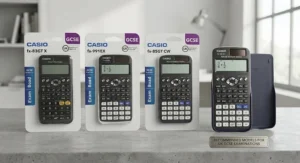
This guide cuts through the confusion honestly: no invented reviews, no puffed-up marketing claims, just real models, real specs, and straight talk about which one actually earns its place in your pencil case. We’ve researched genuine UK retailers, cross-checked exam board guidance, and pulled together seven real, currently available options spanning budget to premium. Whether you’re kitting out a Year 7 starting secondary school or replacing a battered model before Year 11 mocks, you’ll find a fit here. We’ll also cover what “exam board approved” really means, how to build a wider maths equipment set, and how to get more out of a revision guide once your calculator is sorted.
What is a scientific calculator for GCSE? It’s a non-programmable calculator — typically a Casio, Sharp, or Texas Instruments model — that handles trigonometry, standard form, fractions, statistics, and surds without offering banned features like symbolic algebra, calculus solving, or internet connectivity, as set out in JCQ exam regulations followed by every UK awarding body. For a broader technical grounding in how these devices evolved from simple slide-rule replacements into the multi-function tools sold today, the general history and classification of scientific calculators is a genuinely useful starting point.
Quick Comparison Table: Scientific Calculators for GCSE at a Glance
Short on time? Here’s the shortlist before we go deep on each one.
| Model | Power Source | Best For | Price Range |
|---|---|---|---|
| Casio fx-83GTX | Battery only | Tightest budgets, first-time buyers | around £9-£14 |
| Casio fx-85GTCW | Solar + battery | Students who forget to charge or replace things | around £12-£19 |
| Casio fx-991CW Advanced | Solar + battery | Students heading toward A-level | around £20-£28 |
| Texas Instruments TI-30X Pro MultiView | Solar + battery | GCSE-to-A-level bridge, non-Casio households | around £20-£27 |
| Sharp EL-W531TL WriteView | Battery only | Families who want a genuine Casio alternative | around £8-£17 |
Reading across that table, the pattern is pretty clear: price climbs with future-proofing, not with exam suitability. Every single model here is fine for GCSE Foundation and Higher tier calculator papers — the Casio fx-83GTX does exactly the same core job as the Casio fx-991CW Advanced on results day, it just doesn’t carry the extra headroom for A-level further maths later. If your child is doing GCSE and stopping there, don’t let anyone talk you into paying triple for functions that never get used.
💬 Just one click — help others make better buying decisions too!😊
Top 7 Scientific Calculators for GCSE: Expert Analysis
We’ve deliberately spread this list across budget, mid-range, and premium options, plus a couple of lesser-known alternatives that don’t get the marketing spend of the big Casio range but still do a genuinely solid job. Every model below is non-programmable and complies with JCQ’s “must not have” list — no CAS, no symbolic calculus, no wireless features — so exam-day compliance isn’t the differentiator; day-to-day usability is.
1. Casio fx-83GTX — the UK’s default GCSE calculator
The standout feature here isn’t flashy at all: it’s ubiquity. This is the model your teacher already knows how to demonstrate, because it’s sitting in front of roughly half the class. That matters more than people think — a calculator nobody can help you troubleshoot is a liability during revision season. The natural textbook display shows fractions, surds, and powers exactly as they appear on the exam paper rather than forcing everything into a single flat line, which genuinely reduces transcription errors when copying an answer down. It runs on battery only, with no solar backup, so it’s simple rather than sophisticated — there’s nothing here beyond core GCSE-level trigonometry, statistics, and standard form functions, and that’s the point.
Who it’s for: anyone buying a first scientific calculator on a tight budget, or a school replacing a full class set where uniformity matters more than extras. Aggregated retailer feedback consistently flags this as the most recommended model by maths teachers specifically because its button layout matches what’s taught in class — reviewers describe it as reliable rather than exciting, which is exactly the right kind of boring for exam kit. A recurring theme in customer feedback is that the battery-only design means it occasionally dies mid-revision-session without warning, so a spare CR2032 cell is worth keeping in the equipment tin.
Pros:
- ✅ Cheapest genuinely exam-approved option available
- ✅ Matches what most GCSE maths teachers demonstrate in class
- ✅ Natural textbook display reduces transcription mistakes
Cons:
- ❌ No solar backup, so battery failure is a real risk
- ❌ No spare functions for A-level if maths continues
Typically found in the £9-£14 range depending on retailer and colour variant, the Casio fx-83GTX is the easiest “yes” on this list — for pure GCSE use with no future-proofing required, it’s genuinely hard to justify spending more.
2. Casio fx-85GTCW — same brain, solar-powered peace of mind
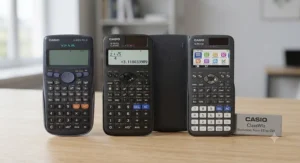
Functionally identical to the fx-83GTX in almost every respect, the standout feature is the dual power source: solar cell plus battery backup, so a dead battery on exam morning stops being a catastrophe. That single design choice is worth dwelling on, because “my calculator died in the exam” is a genuinely common story from students, and it’s entirely avoidable for a few extra pounds. Beyond the power supply, you’re looking at the same 260-plus function set, the same natural display, and the same button layout as its cheaper sibling, which means switching between the two models involves zero relearning.
The honest analytical case for this one is about risk management rather than capability — it’s for the student who’s forgotten to charge a phone at least once this month, or the parent who doesn’t want a 6am scramble for spare batteries before a calculator paper. Aggregated review sentiment across UK retailers mirrors the fx-83’s — high praise for reliability, consistent notes that build quality feels sturdy for the price — with the added, repeated observation that the solar strip keeps working under normal classroom and desk lighting without needing direct sun.
Pros:
- ✅ Solar plus battery means it basically never dies unexpectedly
- ✅ Identical layout to the fx-83, so no relearning needed
- ✅ Sturdy build quality reported consistently across retailers
Cons:
- ❌ Costs a few pounds more for the same core functions
- ❌ Still lacks the tabular and spreadsheet tools of pricier models
Sitting around £12-£19 depending on where you buy it, the Casio fx-85GTCW is the sensible middle-ground pick — not the cheapest, not the most powerful, just the one least likely to let you down on the day.
3. Casio fx-991CW Advanced — built to outlast GCSE entirely
This is Casio’s most advanced scientific calculator, and the standout feature is genuine longevity: it’s approved from Key Stage 3 through to university-level engineering coursework, complete with a built-in QR code function that links to worked video walkthroughs of your specific calculation. On paper that sounds like a gimmick, but the spreadsheet mode and expanded 500-plus function library mean statistics, complex numbers, and matrix work — content that shows up at A-level and beyond — are handled natively rather than being cobbled together with workarounds.
Here’s what the spec sheet won’t quite tell you: for GCSE alone, most of this calculator’s power sits dormant. Based on the spec comparison with the fx-83 and fx-85, a GCSE-only student gains almost nothing functionally from the upgrade — the exam board syllabus simply doesn’t touch complex numbers or matrices. Where it earns its price is for a student who already knows they’re continuing to A-level maths or a STEM subject, because buying once now avoids a second purchase in Year 12. Reviewer sentiment on major UK retail sites is strongly positive, repeatedly citing the display clarity and the sense that it’s a “calculator for life” rather than a two-year GCSE tool, with occasional comments that the extra buttons take a short adjustment period for younger students.
Pros:
- ✅ Covers GCSE right through to university-level functions
- ✅ QR code links to genuine step-by-step video solutions
- ✅ Spreadsheet mode is a rare feature at this price point
Cons:
- ❌ Most functions go unused for GCSE-only students
- ❌ Highest price point on this list by a clear margin
Typically priced around £20-£28, the Casio fx-991CW Advanced only really makes financial sense as an investment across GCSE and A-level combined — buying it purely for a two-year GCSE course is arguably overkill.
4. Texas Instruments TI-30X Pro MultiView — the non-Casio alternative worth knowing about
Texas Instruments doesn’t get anywhere near the classroom visibility Casio enjoys in UK schools, and that’s precisely why it’s worth a mention here — it’s a genuinely capable, JCQ-compliant advanced scientific calculator that most students have simply never been shown. The standout feature is its four-line MultiView display, which lets you see a current calculation stacked above previous ones simultaneously, making it easier to spot where an error crept in without starting again from scratch. It meets the Department for Education’s GCSE and A-level specification requirements directly, including fraction keys, prime factorisation, iterative equation solving, and — for students heading toward Further Maths — Poisson distribution calculations that most rival models at this price don’t offer.
Where this one earns genuine commentary rather than a spec dump: it’s numeric, not symbolic — it can compute a derivative or an integral at a specific point, but it can’t produce the algebraic working, which keeps it firmly within JCQ’s rules while still giving stronger students a useful checking tool. Reviewer feedback for the wider TI-30X family (this model inherits the reputation of TI’s long-running 30-series) consistently praises the display clarity and the classic, uncluttered TI button layout; the trade-off most commonly raised is that switching from a Casio to a TI mid-course does require a short relearning period, since menu structures and key positions differ meaningfully between the two brands.
Pros:
- ✅ Four-line MultiView display makes spotting errors easier
- ✅ Meets DfE specification for both GCSE and A-level use
- ✅ Genuine alternative if a household already prefers TI kit
Cons:
- ❌ Aggregated review volume is thinner than for market-leading Casio models
- ❌ Switching from Casio requires a short relearning curve
Generally available in the £20-£27 range, the Texas Instruments TI-30X Pro MultiView is best suited to a student (or a sibling set) already comfortable with TI calculators from earlier study, or anyone who specifically wants a non-Casio option without sacrificing exam compliance.
5. Sharp EL-W531TL WriteView — the quietly capable challenger
Sharp’s calculators rarely top “best of” lists dominated by Casio, but the EL-W531TL deserves a proper look — the standout feature is its WriteView four-line dot-matrix display, which renders fractions, powers, and roots in genuine textbook notation across 420 functions, comfortably ahead of the entry-level Casio models on raw function count. It’s explicitly marketed as GCSE Foundation and National 4/5 recommended, and the slide-on hard case is a small but appreciated detail — it’s genuinely more protective in a school bag than Casio’s flip-open cover.
The honest analytical read here: Sharp calculators tend to sit at a lower price point than the equivalent Casio for a comparable or slightly larger function set, which makes this a strong value pick precisely because the brand carries less classroom-visibility premium. The trade-off, and it’s a real one worth weighing, is that your maths teacher is statistically less likely to be demonstrating on a Sharp at the front of the classroom, so you may occasionally need to translate a Casio-specific instruction into Sharp’s slightly different menu structure yourself. Aggregated Amazon UK customer sentiment for this model sits strongly positive, with a large volume of ratings clustering around 4.5 stars out of 5, and recurring praise for the display quality relative to price; occasional criticism centres on the plastic casing feeling less premium than Casio’s equivalent.
Pros:
- ✅ More functions than entry-level Casio models for a similar price
- ✅ WriteView display genuinely matches textbook notation
- ✅ Slide-on hard case offers solid everyday protection
Cons:
- ❌ Less classroom familiarity, so teacher demos may not match
- ❌ Casing feels slightly less premium than Casio’s equivalents
Priced roughly £8-£17 depending on colour and retailer, the Sharp EL-W531TL WriteView is arguably the most underrated pick on this entire list for buyers willing to step outside the Casio default.
6. Casio fx-991EX ClassWiz — the previous-generation flagship, still going strong
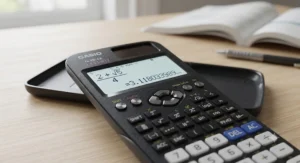
Before the CW range arrived, the fx-991EX was Casio’s advanced flagship, and it hasn’t actually gone anywhere — it’s still widely stocked, still JCQ-compliant, and its standout feature remains the same QR-code-to-video-solution system the newer CW models inherited, alongside a spreadsheet function and support for complex numbers, matrices, and vector calculations. Because it’s a generation behind the fx-991CW, it’s frequently discounted relative to the newer model while offering essentially the same practical headroom for a GCSE-and-beyond student.
Based on the spec comparison, the functional gap between this and the current fx-991CW Advanced is genuinely small for GCSE purposes — the newer model refines the interface and adds a handful of extra functions, but a student sitting GCSE papers in 2026 won’t be disadvantaged by an fx-991EX rather than a fx-991CW. What most buyers overlook is that “previous generation” in calculator terms doesn’t mean outdated in any functional sense the way it might with a phone; JCQ approval doesn’t expire, and the underlying maths hasn’t changed. Reviewer sentiment gathered from UK forums and retailer comment sections leans favourable, with long-term owners specifically noting durability across multiple school years as the standout theme; a recurring criticism is that battery life feels shorter than the newest CW models under heavy daily classroom use.
Pros:
- ✅ Same advanced function set as the newer CW model
- ✅ Often available cheaper than the current flagship
- ✅ Long-term durability repeatedly noted by owners
Cons:
- ❌ Being phased out, so stock and colour choice can be limited
- ❌ Reported battery life shorter than the newest generation
Usually available around £18-£26, often below that when discounted, the Casio fx-991EX ClassWiz is the savvy buy for a family who wants flagship features without paying full price for the newest badge.
7. Helect 2-Line Engineering Scientific Calculator — the honest budget backup
Not every household needs — or wants — a second premium calculator sitting in a drawer as a spare. The standout feature of this one is simply its price point: it’s a genuine, non-programmable engineering scientific calculator built for exactly the kind of backup-or-first-calculator role that doesn’t need a big brand name attached. It covers the core scientific functions expected at GCSE level — trigonometry, logarithms, fractions, and standard statistics — on a straightforward two-line display, without the textbook-style natural display of the pricier options above.
The honest analytical take: this isn’t a calculator to build A-level ambitions around, and we wouldn’t recommend it as anyone’s sole GCSE calculator if a Casio or Sharp is affordable instead, purely because the flatter two-line display makes fractions and powers harder to read at a glance than the natural-display models above. Where it earns a genuine place on this list is as the spare in a school bag, the one left at a grandparent’s house for homework help, or the option for a family managing several children’s equipment on a strict budget simultaneously. Independent review data specific to this exact model is thinner than for the branded options above, so we’re flagging that honestly rather than inventing sentiment that doesn’t exist — what’s verifiable is that it’s marketed and sold specifically for school and exam use, and covers the functional ground JCQ requires.
Pros:
- ✅ Genuinely low price point for a spare or backup unit
- ✅ Covers core scientific functions needed for GCSE
- ✅ Useful for households equipping multiple children at once
Cons:
- ❌ Two-line display is harder to read than natural-display rivals
- ❌ Verified independent review data is comparatively limited
Usually listed under £10, though always check current price before buying, the Helect 2-Line Engineering Scientific Calculator earns its spot as a sensible backup rather than a primary recommendation.
Practical Usage Guide: Setting Up Your Calculator for Exam Success
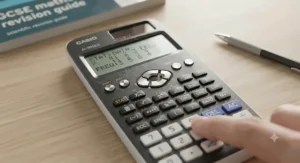
Buying the right model is only half the job — the first thirty days of ownership matter more than most students realise. Start by finding and pressing the “reset” or “clear memory” sequence printed in the manual the moment the calculator comes out of the box; invigilators are trained to check for stored data, and a calculator that still has a sibling’s old programme sitting in memory (even harmlessly) can cause unnecessary exam-day friction. Next, learn where “MODE” lives and how to switch between degrees and radians — this single setting catches out more GCSE students in trigonometry questions than any other mistake, because an answer that’s wildly wrong in radians when the question expects degrees looks like a maths error rather than a settings error.
Write your name and form group on the calculator itself, ideally with a permanent marker on the underside or inside the battery cover rather than a sticker that peels off in a bag — lost, unlabelled calculators are a genuine epidemic in secondary schools. Set a habit of checking the display for the small battery or “low power” icon weekly if you’ve gone for a battery-only model like the Casio fx-83GTX or Sharp EL-W531TL WriteView; running out mid-homework is annoying, running out mid-exam is a crisis. Finally, practise fraction and surd entry specifically using past papers rather than random sums — the button sequence for a mixed number differs from a straightforward division, and muscle memory built under exam time pressure is worth far more than theoretical familiarity built the night before.
Real-World Scenarios: Which Calculator Suits Which Student
If you’re a Year 7 student just starting secondary school with no idea yet whether maths will stick as a favourite subject, the Casio fx-83GTX or Helect 2-Line Engineering Scientific Calculator cover everything needed for years without overspending on capability that won’t be used for a long time, if ever. If you’re a Year 10 or Year 11 student who’s already decided on A-level maths, physics, or engineering-adjacent further study, the calculation shifts entirely — the Casio fx-991CW Advanced or Texas Instruments TI-30X Pro MultiView become genuinely sensible investments, because buying once now avoids a second purchase mid-A-level when the syllabus starts demanding matrix and complex number work.
If you’re a parent managing calculators for three children across different year groups on one household budget, consistency has real value: standardising on one brand and model family — say, the Casio fx-83GTX for the youngest and the Casio fx-85GTCW for the one who’s proven they lose chargers — means fewer manuals to remember and easier sibling hand-me-downs as each child moves up. And if you’re the student who’s already lost two calculators this academic year, honestly, buy the cheapest genuinely compliant option and a spare; the Helect 2-Line Engineering Scientific Calculator or a secondhand Casio fx-83GTX solves the actual problem, which isn’t calculator quality, it’s calculator retention.
How to Choose a Scientific Calculator for GCSE
- Check it’s non-programmable and JCQ-compliant first. Before anything else, confirm the model doesn’t offer symbolic algebra, calculus solving, or wireless connectivity — every calculator on this list already clears that bar, but it’s worth verifying for any model bought elsewhere.
- Decide how far past GCSE the calculator needs to last. A student stopping maths after GCSE genuinely doesn’t need the fx-991CW’s spreadsheet mode; a future A-level student arguably does.
- Weigh solar backup against price. The extra few pounds for dual power on the Casio fx-85GTCW buys real peace of mind if battery habits are unreliable.
- Match the display type to how the student reads maths. Natural textbook display reduces transcription errors for most students; a flatter two-line display like the Helect is fine as a backup but harder as a primary tool.
- Consider brand familiarity with the teacher. A Casio matches most classroom demonstrations directly; a Sharp or TI model is entirely valid but occasionally needs independent menu translation.
- Budget for a spare, not just a primary calculator. Loss and damage are common enough that a second, cheaper unit is genuinely worth the modest extra spend.
- Buy early, not the week before mocks. Familiarity built over months beats last-minute cramming on unfamiliar buttons every time.
What Does “Exam Board Approved” Actually Mean?
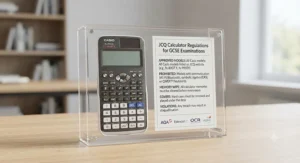
This phrase gets thrown around loosely by retailers, and it’s worth being precise about what it actually means. No individual exam board — not AQA, not Edexcel, not OCR — publishes a definitive list of approved calculator models, because new devices are released constantly and maintaining such a list isn’t practical. Instead, all three major English exam boards follow shared regulations set out by JCQ, the Joint Council for Qualifications, which specify what a calculator must not be capable of rather than naming approved brands directly.
The banned list is short but firm: no language translators, no symbolic algebra manipulation, no symbolic differentiation or integration, no communication with other machines or the internet, and nothing that stores retrievable information like formulas or text. Notably, numeric differentiation and integration — working out a derivative’s value at a specific point without showing algebraic steps — is permitted, which is why advanced models like the Casio fx-991CW Advanced and Texas Instruments TI-30X Pro MultiView remain fully compliant despite their sophistication. It’s also worth understanding that this framework applies specifically to GCSE mathematics; the qualification regulator’s own guidance on calculator use in new GCSEs confirms that between 33 and 50 per cent of GCSE maths marks must come from non-calculator questions regardless of which model a student owns, so calculator choice can never fully substitute for solid mental and written arithmetic.
Common Mistakes When Buying a GCSE Calculator
The single most common mistake is buying a graphic calculator by accident, assuming “more advanced” automatically means “better for GCSE” — graphic models are permitted under JCQ rules but are entirely unnecessary for the GCSE Maths syllabus and add cost without benefit. A close second is buying secondhand without checking the exact model number matches a current, non-discontinued line; older Casio ES and ES Plus ranges, for instance, are technically still compliant but lack the natural textbook display schools now expect students to be fluent in. Parents also frequently under-buy on power source, assuming battery-only models like the Casio fx-83GTX are a false economy risk — in practice this is a manageable risk with a spare battery kept at home, not a reason to overspend on a solar model unnecessarily.
Another recurring error is leaving the purchase until the week before a calculator paper, which sounds minor but genuinely costs marks; students who’ve used the same model for two years navigate fraction and surd entry almost automatically, while a brand-new calculator introduces friction exactly when it’s least affordable. Finally, buying a single calculator for a household with multiple children sitting different exams in different years often backfires — sharing sounds efficient, but a missing calculator on the wrong morning is a real and recurring problem reported anecdotally by parents and teachers alike.
Scientific Calculator vs Graphic Calculator for GCSE
| Factor | Scientific Calculator | Graphic Calculator |
|---|---|---|
| GCSE Maths requirement | Fully sufficient for the entire syllabus | Permitted but unnecessary |
| Typical price range | £8-£28 | £60-£100+ |
| Display | Natural textbook (most models) | Full graphing screen |
| Best for | GCSE, and A-level with an advanced model | A-level Further Maths, some university courses |
Reading this comparison, the practical answer for GCSE is straightforward: don’t buy a graphic calculator. The Casio fx-991CW Advanced and Texas Instruments TI-30X Pro MultiView already stretch into A-level territory without the graphing screen’s added cost, and JCQ permitting graphic calculators for GCSE doesn’t mean the syllabus rewards owning one. Graphic calculators earn their keep later, specifically for A-level Further Maths modules involving visualising functions, and even then, plenty of students manage perfectly well with an advanced scientific model right through to sixth form.
Building the Right GCSE Maths Equipment Set
A calculator is the headline item, but it’s one piece of a wider maths equipment set that quietly affects exam performance just as much. A transparent protractor and a proper compass (not the flimsy plastic type that slips mid-circle) matter for geometry questions on both calculator and non-calculator papers, and a genuinely sharp pencil — not a blunt one dragged from the bottom of a pencil case — makes a measurable difference to the accuracy of constructed angles and lines that examiners actually check. A 30cm ruler beats a 15cm one for anything involving straight-line graphs, since fewer repositioning movements mean fewer small drawing errors compounding across a long line.
Beyond the physical kit, a spare calculator battery, a spare pencil, and a spare eraser belong in every exam pencil case as standard, because JCQ rules mean an invigilator can offer a replacement calculator but can’t magic up your familiar model mid-paper. For students using the Casio fx-85GTCW or Casio fx-991CW Advanced, both solar-assisted, the spare battery matters less urgently but is still sensible insurance. Building this equipment set gradually across Year 9 and 10, rather than in a single panicked shop the week before exams, spreads the cost and means every item has already been tested under real homework conditions before it matters most.
Getting More From Your Revision Guide With the Right Calculator
A good revision guide and a familiar calculator genuinely reinforce each other, but only if the student is practising calculator-based questions with the exact model they’ll bring into the exam hall — working through a printed revision guide’s calculator paper practice questions using a phone’s calculator app, for instance, builds false confidence because phone calculators don’t replicate the exact button sequences or fraction display of a real exam-approved model. When choosing a revision guide, look specifically for one that includes a dedicated calculator methods section — covering standard form entry, statistical mode, and fraction-to-decimal conversion step by step — rather than one that assumes calculator fluency is already in place.
Practically, this means pairing purchases: buy the calculator early in Year 10, and use a revision guide’s calculator practice papers as the vehicle for building genuine muscle memory, not just mathematical understanding. Students working through worked examples in a revision guide using the natural display on models like the Sharp EL-W531TL WriteView or Casio fx-85GTCW tend to catch entry errors faster, simply because the on-screen fraction or surd matches what’s printed on the page, making mismatches obvious immediately rather than only surfacing as a wrong final answer with no clear cause.
Long-Term Cost & Value Beyond GCSE
Judged purely on a two-year GCSE timeline, the cheapest compliant option always wins on cost-per-use — a Casio fx-83GTX at roughly £9-£14 comfortably outlasts two years of homework and exams for a fraction of the outlay of the flagship models. The maths changes the moment A-level or further study enters the picture. A student who buys the Casio fx-991CW Advanced or Texas Instruments TI-30X Pro MultiView in Year 10 and carries it through to Year 13 spreads that £20-£28 cost across roughly five years of active use rather than two, which meaningfully lowers the effective annual cost compared with buying a budget model twice.
The honest total-cost-of-ownership picture also has to account for loss and damage, which is where the calculus shifts back toward budget models for many families — spending less on a primary calculator and holding back a small amount for the near-certainty of a replacement at some point across five years of secondary school is often more realistic than banking on one premium unit surviving untouched. There’s no universally “correct” answer here; it genuinely depends on how firmly a subject path is already decided and how a particular household tends to treat expensive electronics in a school bag.
Frequently Asked Questions
❓ What is the best scientific calculator for GCSE?
❓ Can I use a graphic calculator in GCSE maths exams?
❓ Do I need a new calculator or can I use an older model?
❓ What's the real difference between the Casio fx-83 and fx-85?
❓ Is the Casio fx-991CW allowed in GCSE exams?
Conclusion
There isn’t a single “correct” scientific calculator for GCSE, and honestly, that’s good news — it means the decision comes down to genuinely knowing your own situation rather than chasing a mythical perfect model. Buying on a tight budget with no plans beyond GCSE points firmly toward the Casio fx-83GTX or the Helect 2-Line Engineering Scientific Calculator as a spare. Wanting a little insurance against a flat battery on exam morning makes the Casio fx-85GTCW worth the extra few pounds. And a student already eyeing A-level maths, physics, or engineering genuinely benefits from investing once in the Casio fx-991CW Advanced or the Texas Instruments TI-30X Pro MultiView, spreading that cost across years rather than a single course.
It’s also worth remembering that England’s GCSE awarding bodies, including AQA, Edexcel and OCR, all interpret the JCQ calculator rules identically, so a compliant model bought for one exam board’s specification remains compliant if a school later changes its syllabus provider. Whichever model ends up in the pencil case, the calculator itself is only ever half the exam-day equation — pairing it with genuine practice, a solid revision guide, and the rest of a properly stocked maths equipment set matters just as much as the badge on the calculator’s casing. Buy early, learn the buttons properly, keep a spare battery close, and the calculator stops being a source of exam-day anxiety and becomes exactly what it should be: a reliable, unremarkable tool that just works when it matters.
✨ Ready to compare current prices and grab the right model before term starts?
🧮 Check availability on the options above and get exam-ready with confidence!
Recommended for You
- Pencil Case for Secondary School: 7 Best Picks for 2026
- Backpack for Year 7: 7 Best Picks for a Tough Term (2026)
- School Starter Pack Under £25: 7 Best Value Picks (2026)
Disclaimer: This article contains affiliate links. As an Amazon Associate, I earn from qualifying purchases. If you purchase products through these links, we may earn a small commission at no additional cost to you.
✨ Found this helpful? Share it with your friends! 💬🤗
